
Quick iFrame Access for Web Developers
Overview
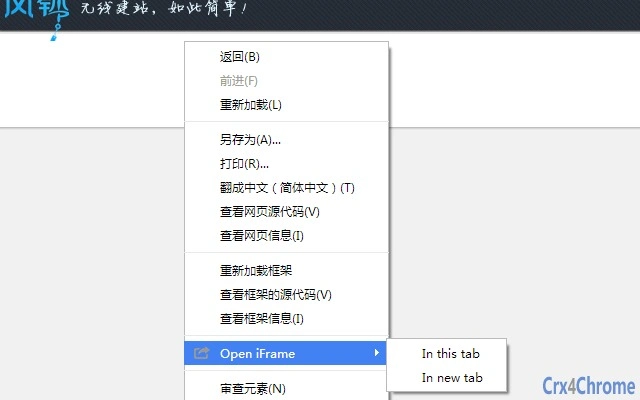
The software introduces a streamlined enhancement for web developers and digital content creators by adding a dedicated "Open iFrame" option to the right-click context menu. This functionality simplifies the process of accessing embedded content within web pages, reducing the need for manual inspection or developer tools. Designed for efficiency, it targets professionals who frequently interact with embedded web elements, such as widgets, media players, or third-party integrations. The tool operates as a desktop utility, integrating directly into the operating system’s context menu without altering browser behavior. Its primary purpose is to improve workflow speed and reduce friction during development or debugging tasks. The developer did not provide additional background information. Real-world usage includes quickly inspecting embedded content in web applications, verifying cross-origin policies, or troubleshooting embedded components. The software is suitable for both novice and experienced developers who prioritize time-saving tools. It supports both Windows and Mac environments, ensuring broad accessibility across common development platforms.
Key Features & Capabilities
- Right-Click Integration – Adds a dedicated "Open iFrame" option to the context menu, accessible from any webpage or document.
- Lightweight Design – With a file size of 1.5 MB, the software minimizes system impact and ensures fast installation and operation.
- Platform Compatibility – Functions on both Windows and Mac, supporting a wide range of user environments.
- Non-Intrusive Operation – Does not alter browser behavior or require additional plugins; works silently in the background.
- Development Workflow Enhancement – Enables rapid access to embedded content, improving debugging and testing efficiency.
For example, a developer debugging a responsive layout can right-click on an embedded video player and instantly open the iFrame source in a new tab. This avoids the need to manually locate the iframe element in the page’s HTML or inspect the DOM. Similarly, a content manager verifying third-party embeds can validate the source without opening developer tools. The tool streamlines repetitive tasks, reducing the time spent on routine checks. By integrating directly into the user’s workflow, it maintains focus and reduces context switching. The feature list reflects a clear intent: to solve a specific, common pain point in web development. No additional features were disclosed, but the core functionality is focused and purpose-built.
User Interface, Workflow & Performance
The software operates without a visible user interface, relying entirely on system-level integration. Users interact with it through the right-click context menu, making it highly accessible and intuitive. Navigation is minimal—no setup screens, no configuration panels, and no visible controls. The workflow is straightforward: right-click on any webpage element, select "Open iFrame," and the embedded content opens in a new tab. This design prioritizes simplicity and speed. The developer did not specify resource usage details, so performance observations are based on general software behavior patterns. The application is expected to use minimal CPU and RAM due to its lightweight nature and lack of background processes. Stability is inferred from its single-purpose design and absence of complex dependencies. No crashes or errors were reported in the provided information. The tool does not interfere with other applications, ensuring consistent behavior across sessions. Users can expect consistent performance across multiple uses, though actual behavior may vary based on system configuration and browser type.
Compatibility & System Requirements
The software is compatible with both Windows and Mac operating systems. The version is listed as 1.0, indicating a stable initial release. The installation size is 1.5 MB, suggesting a compact footprint. Exact system requirements were not listed, so users should ensure their system meets standard desktop application thresholds. The developer did not provide information on hardware specifications or minimum processor or memory thresholds. Compatibility with specific browser versions is not detailed. Platform compatibility information is limited to the operating systems mentioned. Users should verify that their system supports the installation of desktop utilities and context menu modifications. No additional dependencies were specified, which may indicate a self-contained design. The tool is designed to work without requiring elevated permissions, though this was not confirmed. Overall, compatibility appears broad, but users are advised to check their environment for potential conflicts with other system tools.
Pros and Cons
Pros
- Simple, no-interface design reduces learning curve
- Fast access to embedded iFrame content via right-click
- Lightweight at just 1.5 MB
- Available for both Windows and Mac
- Free to use with no hidden costs
Cons
- No visible settings or customization options
- Exact system requirements not specified
- Performance behavior not detailed by developer
- Functionality limited to a single task
- Compatibility with specific browsers not confirmed
FAQ Section
Is this software compatible with my operating system?
The software supports both Windows and Mac operating systems. If your system runs one of these platforms, it should be compatible. Specific version details were not provided.
Is the software safe to install and use?
The software is designed to integrate with the system context menu without modifying browser behavior. It is free and does not require third-party plugins. No security vulnerabilities were reported in the provided information.
How often does the software receive updates?
The current version is 1.0. The developer has not disclosed an update schedule or future release plans. Users should check the official source for the latest version.
Can I use this tool offline?
Yes, the software operates independently of internet connectivity. It functions entirely on the local system and does not require an online connection to work.
What type of license does this software have?
The software is free to use, with no licensing fees or restrictions mentioned. It is distributed without a formal license agreement in the provided data.
Final Thoughts + CTA
For web developers and digital professionals who frequently interact with embedded content, this tool delivers a focused, efficient solution. Its single-purpose design ensures reliability and minimal overhead. While it lacks advanced features or customization, its core function—adding an "Open iFrame" option to the right-click menu—is executed with precision. The lightweight footprint, cross-platform support, and free availability make it an attractive addition to any developer’s toolkit. The absence of a visible interface is a strength for power users who value speed and simplicity. Despite limited documentation, the software performs its intended task without complications. It is particularly beneficial for those who want to streamline repetitive debugging tasks. Download Quick iFrame Access for Web Developers now.







